 Olivio
Sign in
Sign up
Run your agency.Olivio runs the rest.
One calm place for every client: chats where @name turns a message into a tracked task, audits that run themselves and fix what they find, backlinks that check themselves, and a portal your clients actually open.
Sign in with Google · your own server · every change undoable

A message becomes the task.
Every client gets a group chat. Type @Shivani update the clinic hours by Friday and it's a task with an owner, a due date and a reminder, without leaving the conversation.
- List, board and calendar: the same tasks, however you like to see them, plus repeating work and monthly timelines.
- Proof of work: a task can ask for the link or the file before it can be marked done, and a checker approves it.
- Meeting notes in, tasks out: paste notes or a transcript and the action items go to the right people.
- Workstreams: On-page, Off-page, Social… each team sees its own work and its own chat.

Made for how an agency really works.
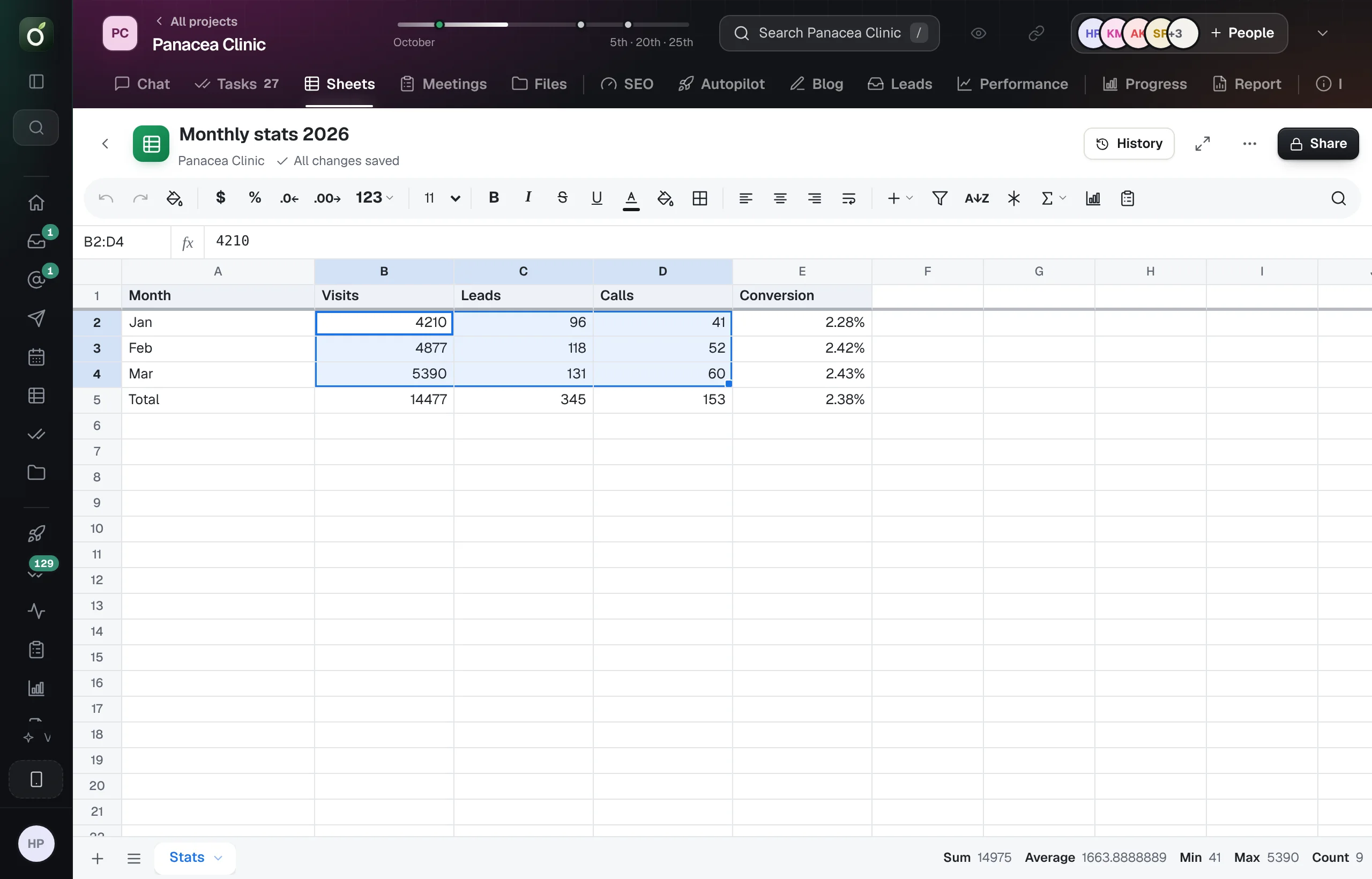
Sheets, inside every client
Spreadsheets like Google Sheets for stats, lists and trackers: formulas, filters, charts, dropdowns, Excel in and out. The team edits together live, and any sheet can be shared by link.
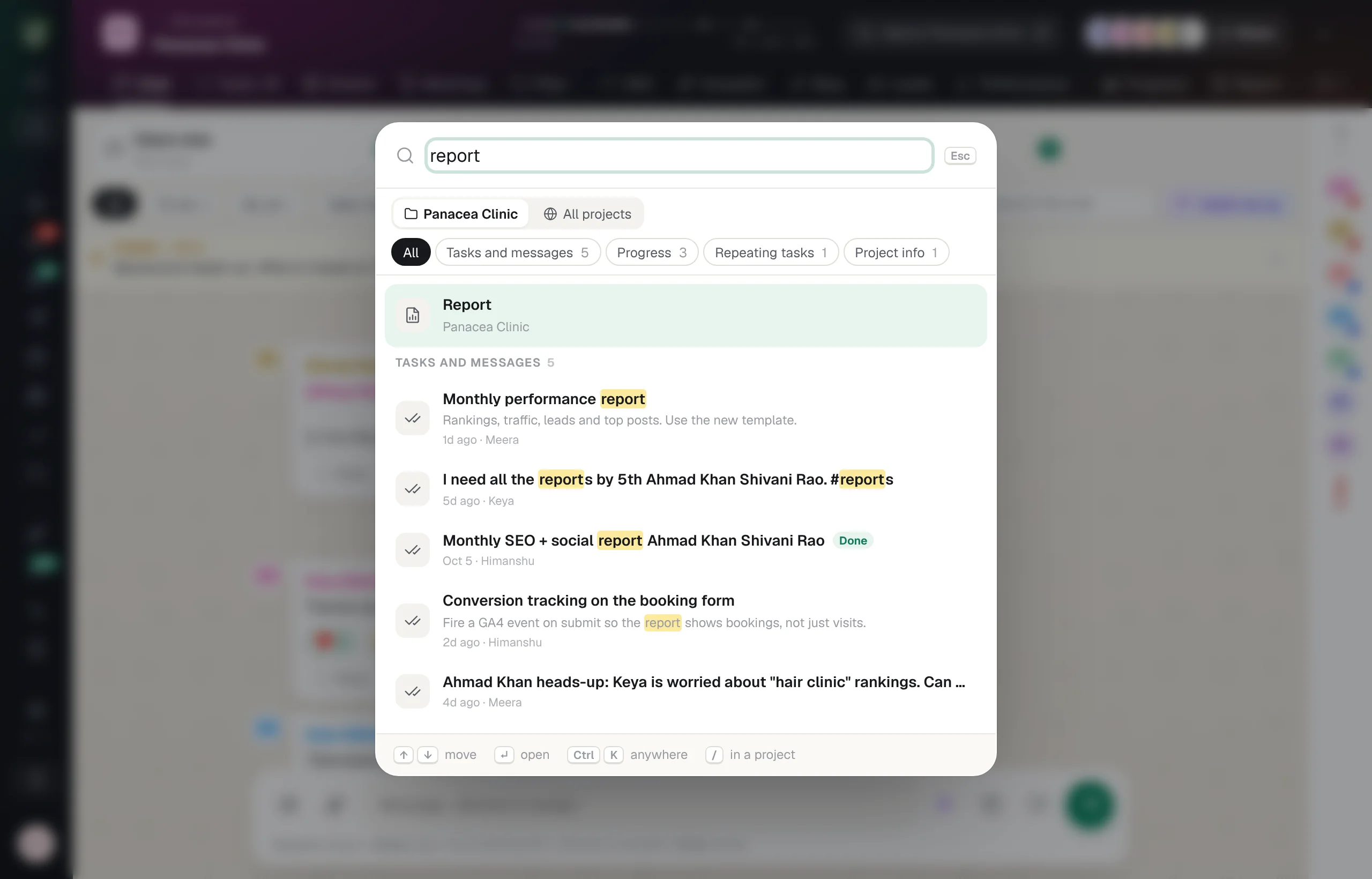
Search everything
Press / on a client, or Ctrl K anywhere: tasks, chat, replies, files, meeting notes, sheet cells, backlinks, leads and blog in one search. Nobody finds what they couldn't open.
Business Profile and YouTube, without the password
Your team posts updates, offers and events, replies to reviews, adds photos, edits the profile, uploads and schedules videos and answers comments from the client's own project, laid out like Google's tools. Every post is checked first: spelling for the client's country, their city, phone and website, and Google's rules. Then it goes to the manager (by name) or straight out, now or at a set time. When someone leaves, remove them from Olivio: no password to change, no devices to chase.
Backlinks that check themselves
Every link handed in is checked straight away and again for life: live, followed, pointing at the client, with the right name, address and phone. Mistakes go back to whoever made them.
Leads from every form
Contact Form 7, Elementor, WPForms, Gravity and 11 more: every enquiry arrives in the client's Leads, spam filtered, even the old ones.
Performance in one view
Search Console, Analytics, the Business Profile, Clarity and leads, side by side, week by week, for any period.
A blog writer with a brief
Keyword, brief, draft, approval and publishing to WordPress, written in the client's voice from their Brand Brain.
An app on every phone
Install it from the browser: notifications, the chat and your tasks in your pocket, for the team and the client.
Systems & procedures
The agency's handbook by department: proposals, approvals, versions and who has read what.
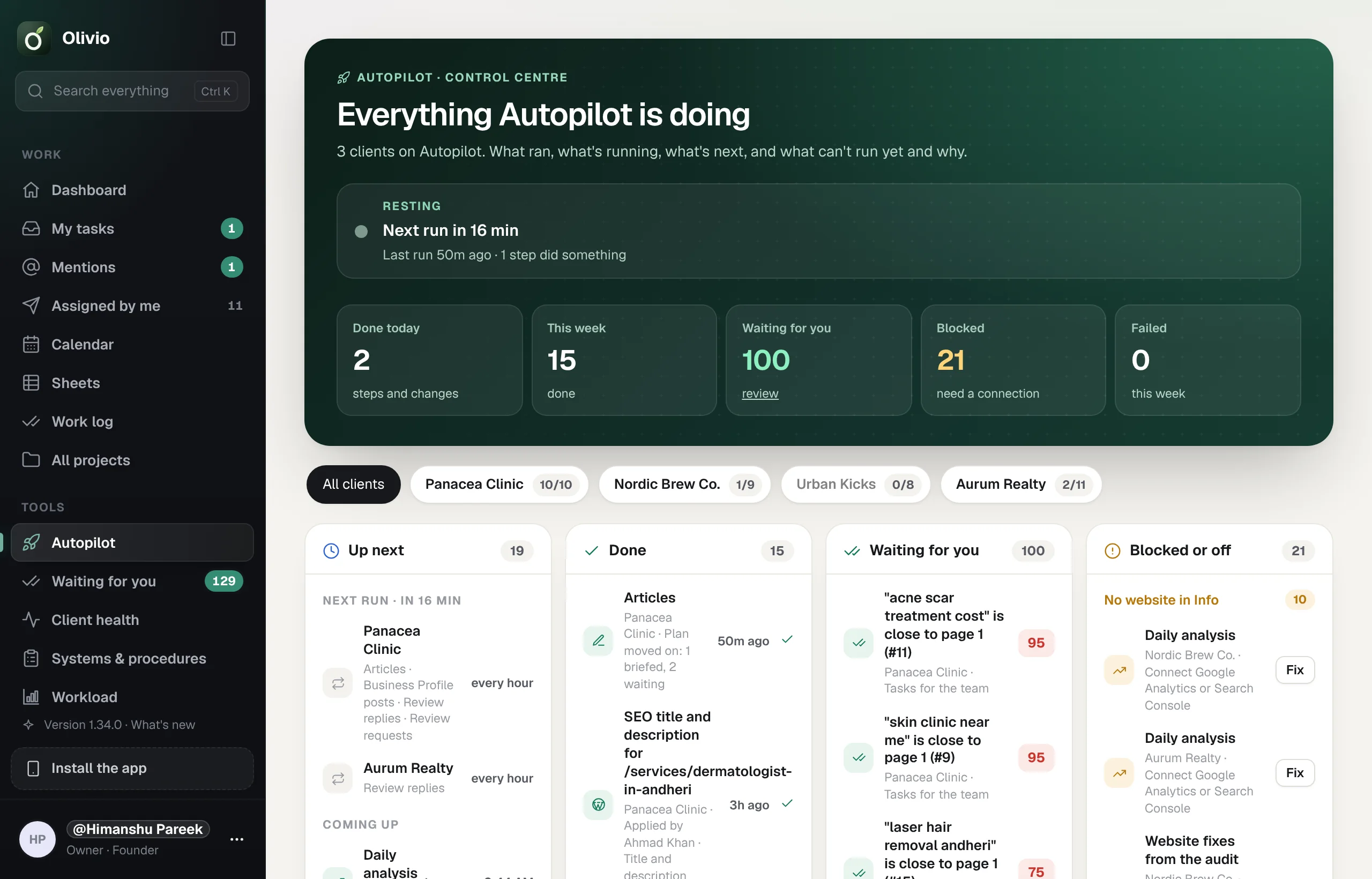
Audits nobody has to start. Fixes nobody has to chase.
Every week each client's website, AI-search presence and Google Business Profile go through more than 170 automated checks and a 278-point checklist, from titles and schema to crawl depth, security headers and answer-engine readiness. Autopilot then fixes what it can, and makes a task for the rest.

Your call, or its own.
For each kind of change you choose: off, ask me first, or just do it. Everything it does is in one history, with the reason and a one-click undo.
- Site fixes: titles, descriptions, schema, alt text, redirects, security headers, llms.txt.
- Reviews and posts on the Business Profile, answered and scheduled.
- Rankings and articles: keywords close to page one become tasks and briefs.
- A control centre shows what ran, what's next and what's blocked, for every client.
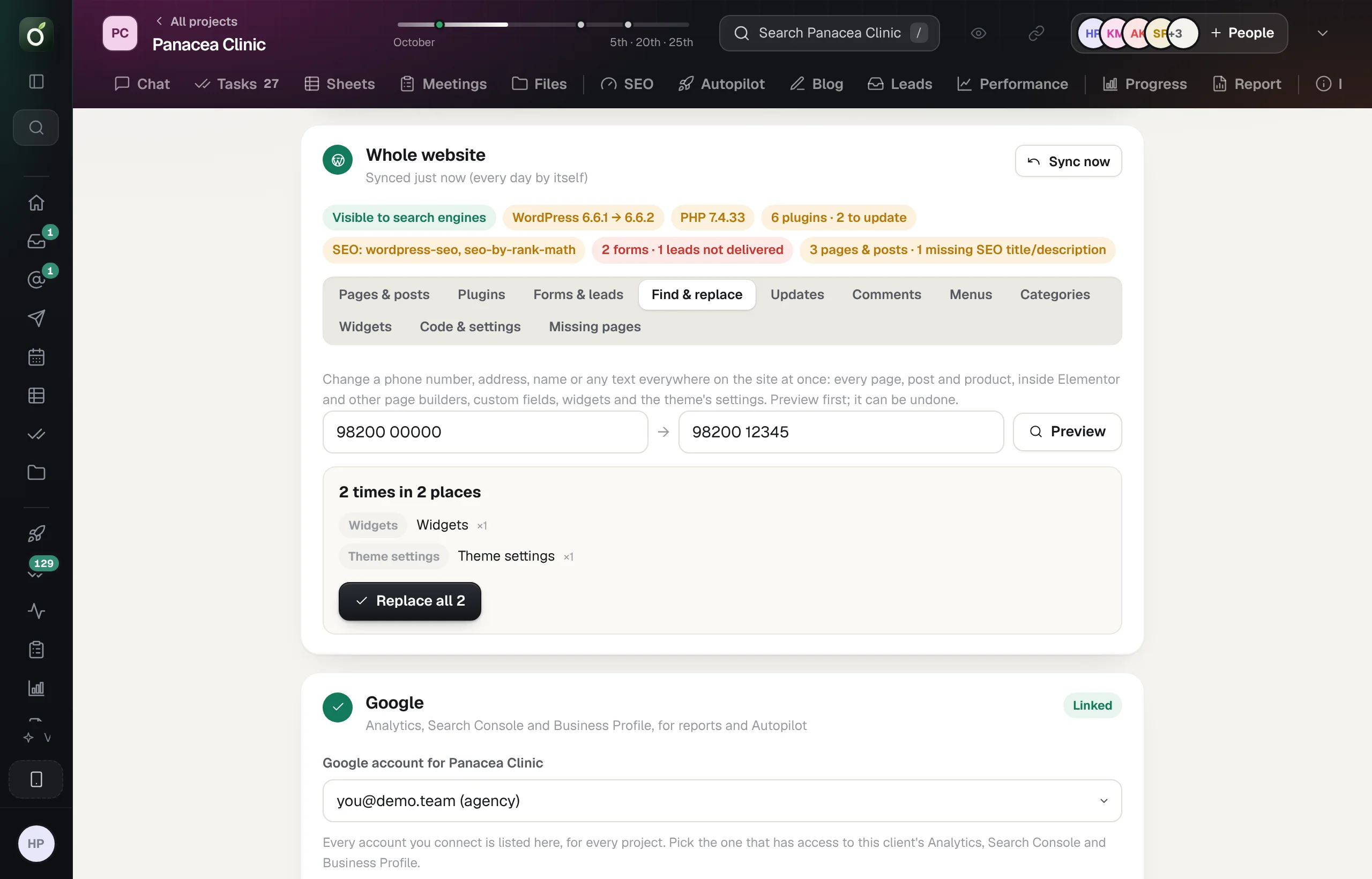
Change anything on any client's site.
The Olivio Autopilot plugin connects a WordPress site in one click. From then on the portal reads and changes everything on it except the images themselves, without anyone logging in to WordPress.
- Find & replace across the whole site, inside Elementor and other builders too, with a preview first.
- Updates one at a time; the site is checked after each, and a plugin that breaks it is switched off again.
- Every change has an undo that puts it back exactly.
Text anywhere, including page builders and custom fields; new pages; WooCommerce prices and stock.
Header, footer, sidebars and block-theme parts, edited from the portal.
Yoast, Rank Math, All in One SEO or SEOPress fields, category SEO, schema and redirects.
Tracking tags, verification, CSS, site title, time zone, permalinks.
Approve, spam or reply; every 404 one click from a redirect.
Each request is signed with a secret only that site and the portal know. Security plugins stay as they are.
No more “where are we?” threads. The client opens their link, and the answer is already there.
Clients see progress before they ask.
Each client gets their own view, with only the tabs you choose: progress on their trackers, this month's checklist, approvals, meeting notes, leads, backlinks and the monthly report.
- Approvals in the chat: approve or ask for changes on a draft, with one tap.
- Share links: blogs, backlinks or the report on a branded page, public or with a password.
- Your brand: your name, logo and colour on everything the client sees.

Yours, and only yours.
Your data lives on your server, backed up to your Google Drive every night.
No passwords to leak. Remove someone and their access ends at once.
Owner, managers, team and clients, workstreams and locked tabs, checked on the server for every request.
An audit trail of who did what, signed-in devices, and an error log that tells you before anyone complains.
Good to know.
Is Olivio only for SEO agencies?
No. A task is just a message with people tagged, so it fits design, development, social, ads, consulting or operations. Services, trackers and the monthly playbook are yours to define. The SEO, website and Autopilot parts switch on for the clients who need them.
What does the client see?
Only what you switch on for them: by default their progress, the client chat, meeting notes you share, files and the monthly report. Never the team chat, internal tasks or Sheets (share a sheet by link instead).
Can Autopilot break a website?
Every change it makes is listed with its reason and can be undone in one click, and you choose per kind of change whether it asks first. Updates check the home page afterwards and switch a broken plugin off again.
Does it work on a phone?
Yes. Install it from the browser like an app, on Android or iPhone, with notifications, for both the team and the client.
Can we bring our clients in from spreadsheets?
Yes. Fill one workbook (or import the CSVs) and all your clients, their details, keywords, people and recurring work arrive in one go. Sheets also import Excel and CSV files as they are.